Usamos cookies essenciais para o site funcionar. Com a sua permissão, também usamos cookies de análise (medir visitas) e de publicidade (anúncios e remarketing). Nada disso é ativado até você escolher. Política de privacidade
Um interpretador é uma receita de inteligência artificial que lê um texto ou uma imagem e devolve só o que você pediu: um campo, uma categoria, um resumo. Você monta a receita uma vez, em passos, testa com casos reais e depois usa quantas vezes quiser, inclusive a partir de outro sistema, pelo botão “Copiar API”. Os interpretadores ficam no menu “Otimização”, ao lado do Benchmark.
Esta página é para quem desenha o processo: analista, coordenador, pessoa de negócio. Não precisa saber programar. As animações tocam sozinhas: passe o mouse para pausar e clique para ver de novo.
Escolher o melhor modeloO Benchmark compara modelos na mesma tarefa e ajuda a escolher o melhor custo e acerto.
O que é
Pense em uma receita de cozinha. Você junta os ingredientes, segue o modo de preparo em etapas e, no fim, tem um prato pronto. No Curator, essa receita se chama interpretador.
Você entrega uma informação. Ela passa por uma ou mais etapas de leitura, uma depois da outra. No final, você recebe um resultado pronto para usar: em uma automação, em um teste ou em outro sistema, por API.
A ideia é separar o trabalho de entender uma informação do resto do processo. Em vez de esconder o pedido à inteligência artificial dentro de cada automação, você concentra esse conhecimento em uma receita com nome, histórico e custo medido.
Ler um ofício e extrair nome, documento e prazo.
Classificar uma mensagem de cliente entre elogio, reclamação ou dúvida.
Resumir um contrato longo em três pontos objetivos.
Como a receita trabalha
PDFOfício — processo 4412
1
Tipo do ofícioDeepSeek
2
Dados da autoridadeKimi
3
ComarcaGPT
Resultado montadoaguardando
Passe o mouse para pausar. Clique para ver de novo.
A tela Interpretadores
Todas as suas receitas ficam numa tela só. Para chegar lá:
Abra o menu “Otimização”Fica na barra de menu, no alto da janela, entre “Configurações” e “Ajuda”.
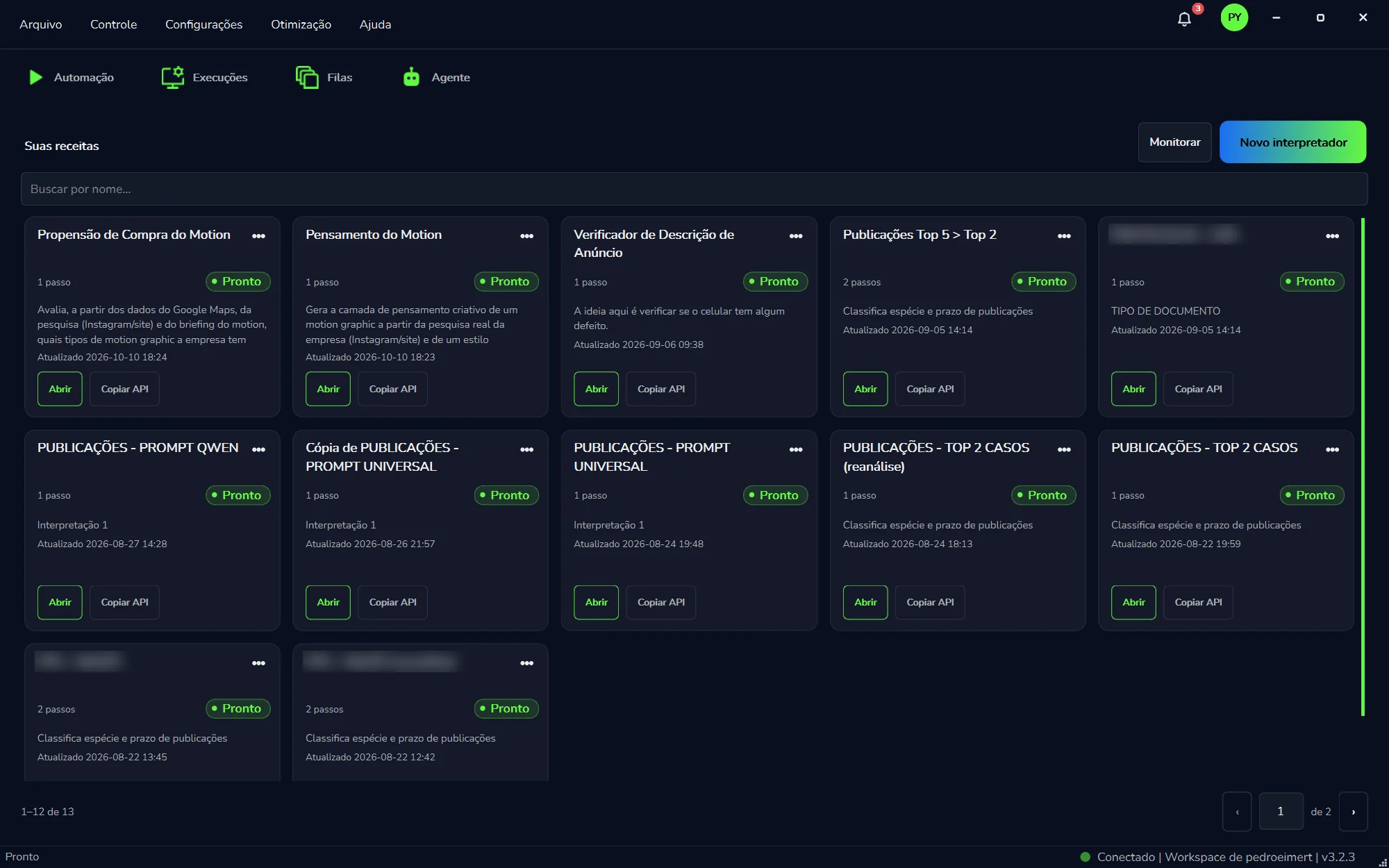
Clique em “Interpretadores”O Curator mostra a lista “Suas receitas”, com um cartão para cada interpretador.
A lista “Suas receitas” na versão 3.2.3. Cada cartão é um interpretador. Clique no print para ampliar.
No alto e no rodapé da lista
Na tela
Para que serve
“Suas receitas”
O título da lista. Cada cartão abaixo é um interpretador seu.
“Buscar por nome...”
Filtra os cartões pelo nome da receita. Por isso vale dar nomes de negócio.
“Monitorar”
Acompanha as rodadas das receitas. Veja Monitorar.
“Novo interpretador”
O botão em degradê azul e verde. Cria uma receita nova. Veja Criar uma receita.
Rodapé
Com muitas receitas, a lista vira páginas. “1–12 de 13” diz quais cartões você está vendo, e as setas trocam de página.
O cartão de cada receita
Cada cartão resume uma receita e traz os dois botões que você mais vai usar. Os números no print correspondem aos itens da lista.
12345678
Um cartão da lista “Suas receitas”, recortado do print acima.
Nome da receitaÉ o que a equipe vê e o que a busca encontra.
“•••”Mais opções do cartão.
“1 passo” / “2 passos”Quantas etapas de leitura a receita tem.
“● Pronto”O selo verde de situação: a receita está pronta.
DescriçãoUma frase sobre o que a receita faz, como “Classifica espécie e prazo de publicações”.
“Atualizado”Data e hora da última alteração.
“Abrir”Entra na receita para ver os passos, ajustar e testar.
“Copiar API”Para chamar a receita de outro sistema. Veja Chamar por API.
Criar uma receita
Clique em “Novo interpretador”É o botão em degradê, no alto da lista, à direita.
Dê um nome de negócio“Triagem de ofícios” diz mais que “Interpretador 2”, e é por esse nome que a busca vai achar a receita.
Monte os passosUm passo para cada tarefa de leitura, cada um com o seu modelo e o seu pedido. Veja As peças e O pedido.
Teste com casos reaisAntes de usar de verdade, rode exemplos e confira passo a passo. Veja Testar e acompanhar.
Quando usar
Use quando a etapa pede para compreender um texto ou uma imagem, e não só aplicar uma regra que nunca muda.
O texto de entrada muda de formato a cada caso.
A regra é fácil de explicar em português, mas difícil de escrever como condição rígida.
A mesma leitura se repete em vários processos da empresa.
Quando vale a pena
Regra fixa
A1NF-101
B2R$ 1.240
C3Pago
Sempre a mesma célula
Precisa ler
Ofício A
Ofício B
Ofício C
O layout muda a cada vez
Passe o mouse para pausar. Clique para ver de novo.
Quando não usar
Se o dado está sempre na mesma célula de uma planilha, ou sempre na mesma posição de um arquivo organizado, uma extração comum é mais rápida, mais barata e mais confiável.
As peças da receita
São cinco ideias. Vale conhecer cada uma antes de abrir uma receita.
As cinco peças
Passe o mouse para pausar. Clique para ver de novo.
Peça
Em português claro
Receita (interpretador)
O conjunto completo: nome, passos e o que precisa receber. Cada receita é um cartão em “Suas receitas”.
Passo
Uma etapa de leitura. Tem um título, um pedido escrito e o modelo de inteligência artificial que executa. O cartão mostra quantos são: “1 passo”, “2 passos”.
Informação que entra
O que você fornece na hora de usar. Pode ser texto ou imagem.
Pedido
O texto em português comum que diz à inteligência artificial o que fazer naquele passo.
Resultado
A saída do último passo. Sempre texto, no formato que você pediu no pedido.
Como a informação anda
Ao clicar em “Abrir” no cartão, você entra na receita. Os passos rodam em ordem, um depois do outro: cada um recebe o que precisa, faz a sua parte e passa o resultado adiante. Um passo também pode reaproveitar o resultado de um passo mais atrás, sem ler tudo de novo.
Como a informação anda
1
Extrair dadosDeepSeek
2
Classificar tipoKimi
3
Achar autoridadeGPT
do passo 1
Passe o mouse para pausar. Clique para ver de novo.
Em cada passo você define quatro coisas: um nome curto (ex.: “Extrair CPF”), o modelo de inteligência artificial, o que entra naquele passo e o pedido. O que entra pode vir de você, na hora do uso, do resultado do passo anterior ou do resultado de um passo específico mais atrás.
Modelos diferentes por passo
Uma classificação simples pode rodar em um modelo rápido e barato. A leitura de um documento complexo merece um modelo mais forte. Você paga mais caro só onde precisa.
Quem cobra pela IA dos interpretadores
Os passos rodam nos modelos que você escolheu, pela sua chave de API: o provedor de cada modelo cobra direto de você, por token. A chave fica só neste computador; a PYE Tech não a recebe. O agente do Curator, na aba “Agente” e no Curador, também usa a sua chave de API, com o modelo que você escolher ali.
O pedido que você escreve
O pedido é um texto em português comum, escrito como você explicaria a tarefa a um colega novo. Um pedido bem escrito costuma ter quatro blocos:
Papel e objetivo. Quem a inteligência artificial é naquele momento e o que ela precisa entregar.
Formato da resposta. Ex.: “um campo por linha” ou “somente uma palavra”.
Regras curtas. O que fazer se o dado não existir, o que evitar.
O conteúdo. O lugar onde o Curator cola a informação real.
Esse lugar no texto aparece assim: {{oficio}}. É o espaço no pedido. Se a informação que entra se chama oficio, você escreve {{oficio}} no ponto exato em que o texto deve entrar.
O espaço no pedido
Leia {{oficio}} e extraia o prazo.
↓
prazo = 15/09/2026
Passe o mouse para pausar. Clique para ver de novo.
Se o espaço não estiver no pedido
Você pode cadastrar a informação e esquecer de escrever {{nome}} no texto. Aí o valor existe na receita, mas nunca chega à inteligência artificial. Releia o pedido de cada passo e confira se o espaço está lá.
Um pedido pronto para copiar
Este pedido tem os quatro blocos. Troque o papel, o formato e as regras pelos do seu caso.
Você é um analista que lê ofícios recebidos pela empresa.
Objetivo: encontrar a data-limite para responder ao ofício.

Responda somente nesta linha, sem explicação:
prazo = DD/MM/AAAA

Regras:
- Se o ofício não trouxer prazo, responda: prazo = (nao_encontrado)
- Não invente datas.

Ofício:
{{oficio}}
Quer ajuda para escrever?
Peça um rascunho ao Agente no modo “Chat”, que conversa sem mexer na automação: conte o que o documento traz e o que você precisa extrair, e peça um pedido com esses quatro blocos. Depois cole no passo e teste.
Testar e acompanhar
Antes de usar uma receita de verdade, teste com exemplos. Assim você vê se ela acerta e, quando erra, em qual passo.
Abra a receitaEm “Suas receitas”, clique em “Abrir” no cartão dela.
Dê um exemplo do que entraCole um texto real ou escolha uma imagem, conforme o que a receita recebe.
Rode e acompanheOs passos rodam em ordem, e cada um mostra se está rodando, se terminou ou se falhou.
Leia passo a passoConfira o que cada passo devolveu, não só o resultado final. É assim que você acha o ponto exato em que a informação se perdeu.
Testar e achar o erro
1Extrair→2Classificar→3Formatar
Passe o mouse para pausar. Clique para ver de novo.
Quando um passo falha, os passos seguintes ficam sem o que usar. Corrija o pedido ou o modelo daquele passo e teste de novo.
Monitorar
O botão “Monitorar”, no alto de “Suas receitas”, reúne o histórico das rodadas: data, sucesso ou falha, qual receita rodou e o custo estimado. O provedor cobra por quantidade de texto, medida em tokens (pedaços de palavra). O número no Curator é uma estimativa para comparar receitas e planejar o volume; a cobrança de verdade vem do provedor, na conta da sua chave de API.
Para uma visão geral do uso de IA no Curator, com o custo calculado por modelo, veja a janela “Uso de IA”.
Três testes bons não garantem cem casos
Antes de colocar a receita num processo de volume, meça o acerto num lote de casos com o Benchmark. Ele roda a mesma receita em vários modelos e mostra qual acertou mais e a que custo.
Chamar por API
Uma receita testada não precisa ficar só no Curator. Todo interpretador pode ser chamado por API: outro sistema da empresa, como um sistema interno, um portal ou um script da equipe de TI, usa a mesma receita que você montou e testou aqui. É o jeito de levar a leitura de documentos para onde o trabalho já acontece, sem copiar o pedido para dentro de cada sistema.
Deixe a receita no pontoTeste com casos reais e, se o volume for grande, meça no Benchmark.
Clique em “Copiar API”Fica no cartão da receita, em “Suas receitas”, ao lado de “Abrir”. O Curator copia os dados para chamar aquela receita.
Entregue para quem vai integrarCole numa mensagem para a TI ou para o fornecedor do sistema que vai usar a receita.
“Copiar API” fica em todo cartão, ao lado de “Abrir”.
Cuide do que foi copiado
Trate como informação interna da empresa: mande só para quem vai fazer a integração, por um canal de confiança. Se outro sistema já chama a receita, teste qualquer mudança antes e avise quem cuida da integração.
O formato técnico da chamada não faz parte deste manual. Para dúvidas na integração, fale com o suporte da PYE Tech.
Onde usar no Curator
Na tela InterpretadoresVocê cria, testa e ajusta a receita, e roda casos avulsos sem precisar de automação.
Nas automaçõesO robô cuida dos cliques e das telas; a receita cuida de entender o conteúdo.
Em outros sistemasPor API, a partir do botão “Copiar API”. Veja Chamar por API.
No BenchmarkCompare modelos na mesma receita e escolha o melhor custo e acerto. Veja Benchmark.
A combinação para volume. Em operação com muitos casos, a fila organiza o trabalho, o Performer executa os cliques e o interpretador entende o conteúdo. Cada peça faz só o que sabe fazer bem.
Dicas
Um passo, uma tarefa. Se o pedido pede três coisas, quase sempre são três passos. Etapas curtas erram menos e são mais fáceis de corrigir.
Peça o formato exato. “Responda somente com uma palavra” ou “um campo por linha, sem explicação”. Sem isso, a inteligência artificial costuma conversar demais.
Defina o que fazer se o dado não existe. Peça um valor fixo, como (nao_encontrado). Sem regra, a inteligência artificial tende a inventar.
Teste com casos feios. O documento bonito sempre funciona. Inclua o escaneado torto, o texto cortado, o caso atípico.
Não esqueça o {{nome}} no pedido. Sem o espaço, a informação cadastrada não chega à inteligência artificial.
Dê nomes de negócio e escreva a descrição. “Triagem de reclamações do SAC” é melhor que “Interpretador 2”. O nome é o que a equipe vê e o que “Buscar por nome...” encontra; a descrição explica a receita no próprio cartão.
Cuidado com dados pessoais nos testes. Prefira exemplos sem dados sensíveis ou com os dados mascarados.
Meça antes de escalar. Três testes bons não garantem cem casos. Use o Benchmark para medir o acerto em lote e comparar modelos por custo e velocidade.
Troque de modelo com prova. Antes de mudar o modelo de um passo numa receita que já está em uso, rode o mesmo lote no Benchmark com o modelo atual e o novo.